


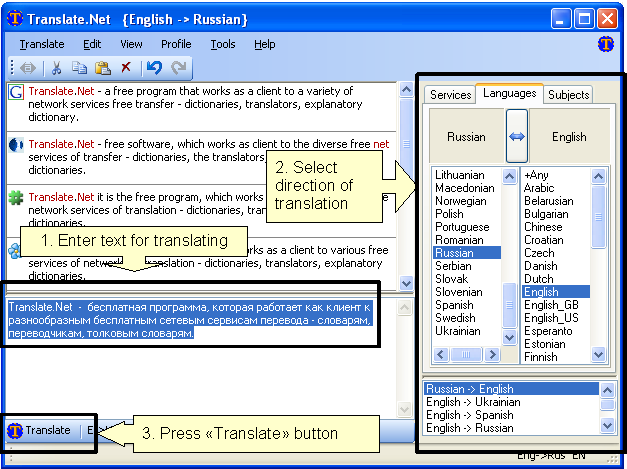
 The Translate.Net will help you to translate words and phrases to and from numerous languages in simple way.
It is free, open-source software work as client to most popular translating services available online (translators, monolingual and bilingual dictionaries).
Already supported 26 sites with language services, 40 services, 39 languages, 1367 translations directions.
User interface enhanced with many smart improvements:
- history of used language pairs which sorted by last use time
- input locale catching - when user change input locale, the latest language pair from history is selected. When user select language pairs - input locale changed accordingly
- system hotkeys (Ctrl+C+C and\or Ctrl+Ins+Ins) allow to activate Translate.Net and easily perform translation from any software
- support of user profiles (user defined sets of services)
- Microsoft .NET Framework Version 2.0 & connection to the internet are needed.
- Just unpack archive to some directory and run X-Translate.Net.exe. All settings stored in own folder so tool can be moved easy.


 Posts
Posts

