VLC media player is a highly portable multimedia player for various audio and video formats (MPEG-1, MPEG-2, MPEG-4, DivX, XviD, WMV, mp3, ogg, ...) as well as DVDs, VCDs, and various streaming protocols.Sunday, November 30, 2008
Portable VLC Media Player V0.9.6 - Update
VLC media player is a highly portable multimedia player for various audio and video formats (MPEG-1, MPEG-2, MPEG-4, DivX, XviD, WMV, mp3, ogg, ...) as well as DVDs, VCDs, and various streaming protocols.Saturday, November 29, 2008
Portable SMPlayer V0.6.5.1 - Update
SMPlayer intends to be a complete front-end for MPlayer, from basic features like playing videos, DVDs, and VCDs to more advanced features like support for MPlayer filters and more.One of the most interesting features of SMPlayer: it remembers the settings of all files you play. So you start to watch a movie but you have to leave... don't worry, when you open that movie again it will resume at the same point you left it, and with the same settings: audio track, subtitles, volume...
Other additional interesting features:
- Configurable subtitles. You can choose font and size, and even colors for the subtitles.
- Audio track switching. You can choose the audio track you want to listen. Works with avi and mkv. And of course with DVDs.
- Seeking by mouse wheel. You can use your mouse wheel to go forward or backward in the video.
- Video equalizer, allows you to adjust the brightness, contrast, hue, saturation and gamma of the video image.
- Multiple speed playback. You can play at 2X, 4X... and even in slow motion.
- Filters. Several filters are available: deinterlace, postprocessing, denoise... and even a karaoke filter (voice removal).
- Audio and subtitles delay adjustment. Allows you to sync audio and subtitles.
- Advanced options, such as selecting a demuxer or video & audio codecs.
- Playlist. Allows you to enqueue several files to be played one after each other. Autorepeat and shuffle supported too.
- Preferences dialog. You can easily configure every option of SMPlayer by using a nice preferences dialog.
- Possibility to search automatically for subtitles in opensubtitles.org.
If you plan on using the "Screenshot" feature, create a subfolder called screenshots. Then select Options, Preferences. Under General, Paths, set "Folder for storing screenshots" to ".\screenshots" and restart.
Download from here.
Thursday, November 27, 2008
Portable Winamp Lite V5.541

When run for the first time, you will be presented with a "WinAmp Setup" window. Uncheck all files associations and anonymous usage statistics settings.
Note that the above extraction instructions are only applicable to Winamp Lite. Hank7 has kindly contributed extraction instructions for Winamp Full.
Download from here.

Wednesday, November 26, 2008
ClamWin Portable V0.941 - Update
ClamWin Free Antivirus is a scanner for viruses and spyware. So, you can take your antivirus on the go.You can place it on your USB flash drive, iPod, portable hard drive or a CD and use it on any computer, without leaving any personal information behind.
It features:
- High detection rates for viruses and spyware
- Regular virus database updates. ClamAV team regularly updates virus databases to include a new virus/variant immediately after it appears
- Standalone Virus Scanner
Please note that ClamWin Free Antivirus does not include an on-access real-time scanner, that is, you need to manually scan a file in order to detect a virus or spyware. Also, ClamWin Portable has scheduled scans and updates disabled as they are not used in a portable scenario.
To install ClamWin Portable double-click it. Select the location you wish to install to and click OK. A PortableClamWin directory will be created there and all the necessary files installed.
ClamWin Portable is a portable wrapper for ClamWin. You may also want to check out ClamWinPortableDBUpdate that automatically updates the virus definitions database in your ClamWin Portable installation periodically or during startup.
Download from here.
Monday, November 24, 2008
LingoPad V2.6 (Multilingual Dictionary)
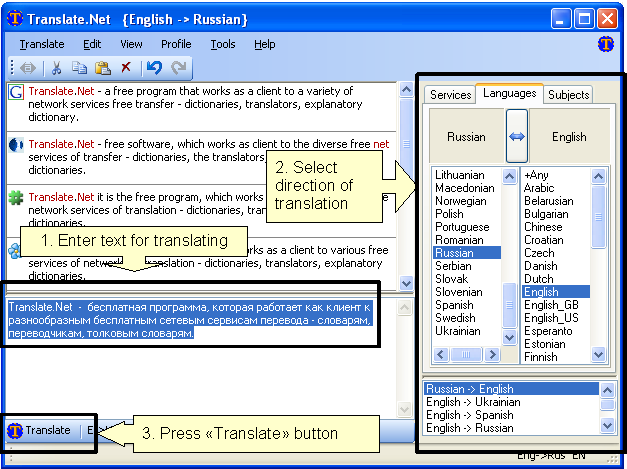
The Translate.Net will help you to translate words and phrases to and from numerous languages in simple way.It is free, open-source software work as client to most popular translating services available online (translators, monolingual and bilingual dictionaries).
Already supported 26 sites with language services, 40 services, 39 languages, 1367 translations directions.
User interface enhanced with many smart improvements:
- history of used language pairs which sorted by last use time
- input locale catching - when user change input locale, the latest language pair from history is selected. When user select language pairs - input locale changed accordingly
- system hotkeys (Ctrl+C+C and\or Ctrl+Ins+Ins) allow to activate Translate.Net and easily perform translation from any software
- support of user profiles (user defined sets of services)
- Microsoft .NET Framework Version 2.0 & connection to the internet are needed.
- Just unpack archive to some directory and run X-Translate.Net.exe. All settings stored in own folder so tool can be moved easy.